Not a subscriber? Subscribe here.
Tech Productivity

Issue #377  (Navigating the Productivity Matrix) 05/04/26


Advertisement

Your Essential Cybersecurity Intelligence Briefing
Discover the latest breaches, emerging vulnerabilities, real-world examples from security and business leaders, and the trends, technology and regulatory changes shaping the cybersecurity landscape.

Dark Reading's award-winning team provides the critical insights you need to strengthen defenses and expand your cybersecurity expertise.

Dark Reading

Designed for IT and cybersecurity professionals, the Dark Reading daily newsletter provides actionable threat intelligence, zero-day vulnerability alerts, and expert analysis to protect your organization and advance your career.

Daily Alert – Signup 🡺

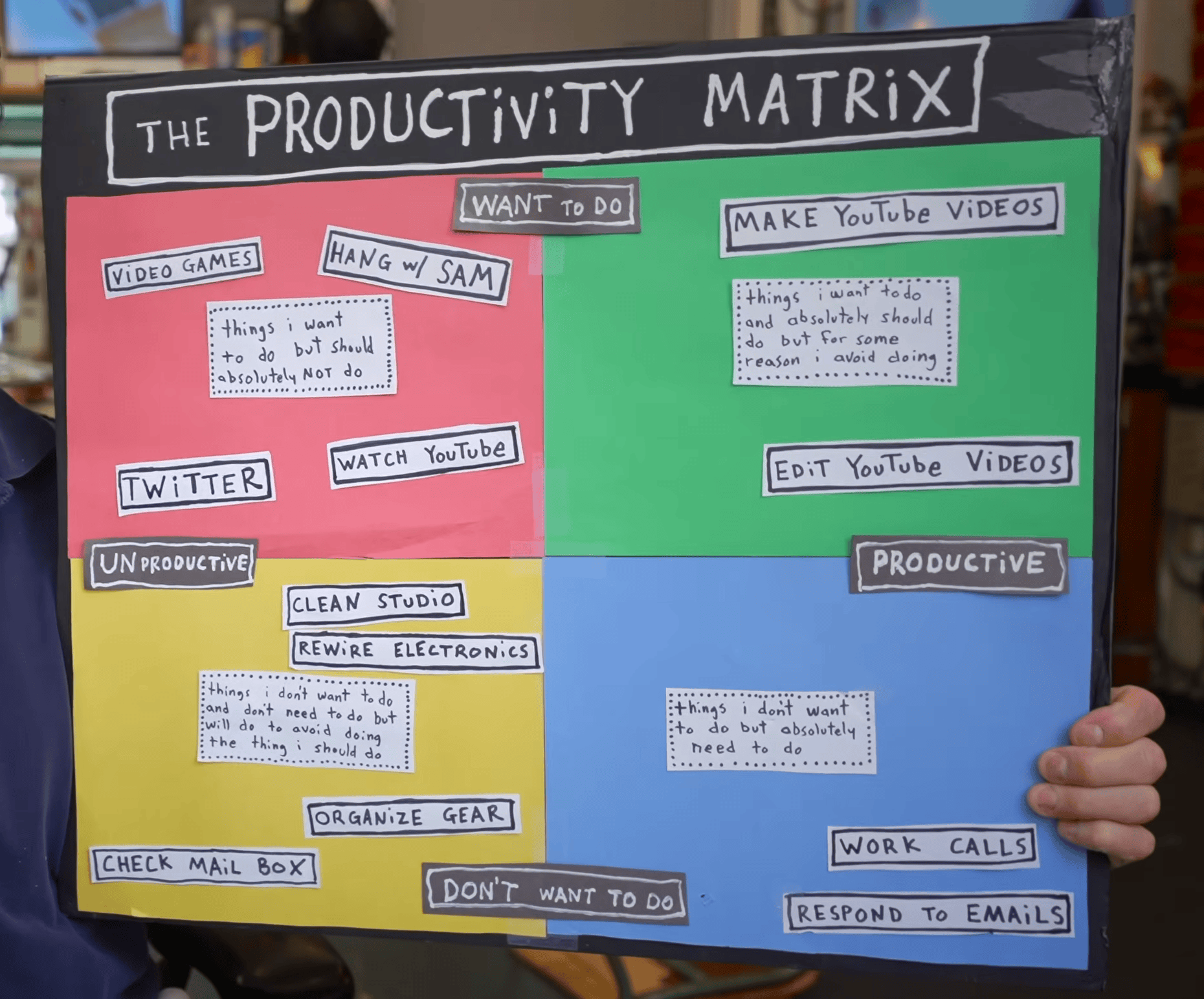
This is a fantastic 10-minute video from Casey Neistat, who breaks down what he calls the Productivity Matrix, a four-quadrant matrix that helps to analyze daily work habits and procrastination.

Casey's honest evaluation of his own habits is refreshing to hear. Even someone who's wildly successful admits that a large chunk of his day simply doesn't feel productive.
 
The Productivity Matrix

To quote him towards the end of the video, and keep in mind the four quadrants displayed in the image above:
 
"It feels like I don't get anything done because no matter how much of [the blue, yellow, and red] work I do, it doesn't accumulate. I have nothing to show for it. There's busy work [the blue] and then there's productive work [the green] and the delta between total procrastination [red] and busy work [blue] is mushy. At times busy work [blue] can feel like procrastination [red] ... But productive work [green], this is absolute. This is tangible. This leaves you with something."

Some great, honest insights into how are days are broken down. And if you want a little more on this subject, the articles section below has a piece that takes the same idea into some new territory.

Now on to this week's hand-picked productivity links!


Tools & Apps

boringBar — A taskbar for macOS that keeps windows organized by desktop, with instant previews, one-click desktop switching, pinned apps, and a searchable app launcher for a cleaner, more organized workflow.

ChatGPT for Excel and GSheets — An official plugin for Excel or Google Sheets to allow you to use ChatGPT to build full spreadsheets, get insights across tabs, add and edit formulas, and update sheets in real time.

WhatCable — A small macOS menu bar app that tells you, in plain English, what each USB-C cable plugged into your Mac can actually do, and why your Mac might be charging slowly.

openvid — An open source video creation tool that lets you create demos and mockups in 4K, with smooth zooms, customized backgrounds, camera, audio, elements, and more.

Your Essential Cybersecurity Intelligence Briefing — Discover the latest breaches, emerging vulnerabilities, real-world examples from security leaders, and trends and regulatory changes shaping the cybersecurity landscape. Get critical insights and intel to protect your organization.     sponsor  

Heynote — A dedicated, native, cross-platform scratchpad app for developers, hackers, researchers, creators, with features like syntax highlighting, auto-formatting, calculator, inline images, and more.

Rewarded Interest — A Chrome extension that allows you to easily skip cookie banners, automate consent preferences, block unwanted trackers, and earn rewards.
 

Articles & Resources

“Cognitive surrender” Leads AI Users to Abandon Logical Thinking, Research Finds — Based on data from the University of Pennsylvania, which they say “demonstrate[s] that people readily incorporate AI-generated outputs into their decision-making processes, often with minimal friction or skepticism.”

Employers Are Using Your Personal Data to Figure Out the Lowest Salary You’ll Accept — According to consumer watchdogs, companies are using signals associated with financial vulnerability, including data on whether someone has taken out a payday loan or has a high credit-card balance.

Do You Know VS Code's Native Features? — 346 pages. 450+ screenshots. 150+ tips. EPUB and PDF formats. Learn to customize and use the native features of Visual Studio Code, the world's most popular code editor.    sponsor  

Productive Procrastination — This article references the video in the intro, discussing how we don't necessarily work on things we have to do, but rather on things we want to do.

Why Your Best Employee Becomes Your Worst Manager — A sobering look at how an organization can be negatively impacted by the wrong promotion a poorly handled employee-to-manager transition period.

When Did Time Become the Enemy? — Interesting quote: "Economist John Maynard Keynes famously predicted in 1930 that by now we’d be working 15-hour weeks, because technology would make us so productive that we could maintain our standard of living with far less labor."

Neuroscientist: How Writing Yourself Letters Can Help You Achieve Goals — Writing your goals on paper can improve your chances of completing them because of a concept scientists discovered in 1978 called “the generation effect.”

Suggestions?

Have a suggestion for a productivity-related tool, article, or other resource? Send me a direct message via X or chat via Bluesky and I’ll consider including it in a future issue.

Stay productive!

Louis
Follow on X Bluesky PayPal.me Advertise

Copyright © Lazarpress. All rights reserved.

Not subscribed? Visit techproductivity.co to join today.